AI in Customer Support: From Ticket Queues to Smart Assistants
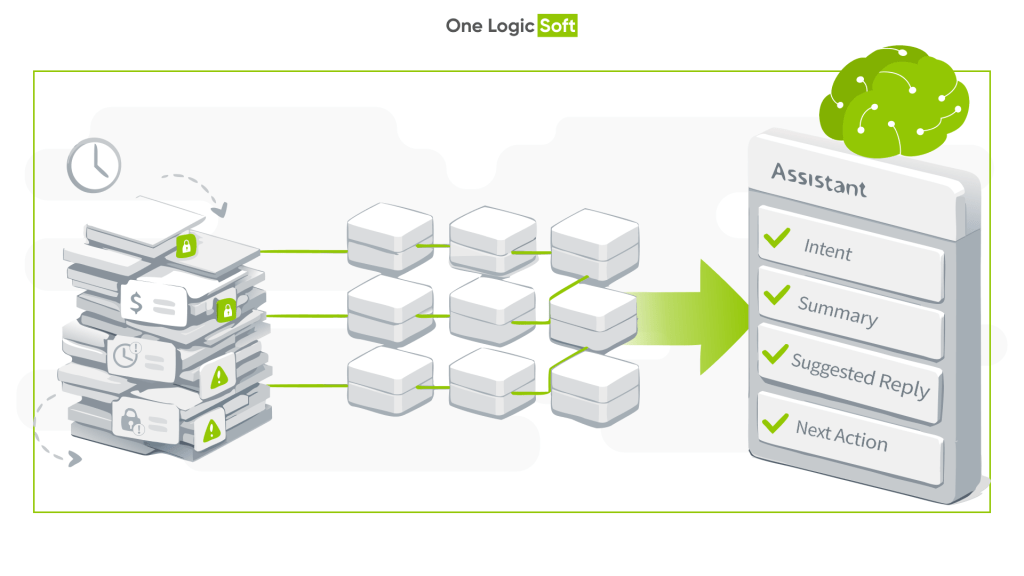
Customer support used to follow a simple flow: a request becomes a ticket, the ticket goes into a queue, and an agent resolves it. That model worked when volumes were manageable and customers tolerated slower replies. Today it is breaking under pressure.
Support demand keeps rising, response expectations keep shrinking, and customers now want continuous, context-aware conversations across email, chat, social, and in-app channels. Meanwhile, support leaders are asked to control costs without degrading quality. This is why AI moved from experiments to production systems.
This article explains how AI is used in customer support today, what it improves in real operations, and where it still needs guardrails.
Why ticket-based support is hitting a ceiling
Most support organizations run into the same bottlenecks.
Repetitive tickets consume human time. Password resets, order status, billing clarifications, account changes, and basic troubleshooting follow predictable patterns, yet they often go through manual triage and back-and-forth.
Queues create avoidable delays. Simple requests wait behind complex cases when routing is based on static rules instead of real context. First response time rises, and customers get frustrated before anyone has even started working.
Agents search more than they solve. Many workflows require jumping between CRM, knowledge bases, internal docs, order systems, and past conversations to reconstruct context. The issue is rarely missing information, it is missing synthesis.
AI adoption typically starts right where these pains show up most clearly.
What “AI in customer support” means in 2026
Modern support AI is not one tool. It is a set of capabilities that work together across the lifecycle of an interaction.
Intent detection and language understanding
Natural language models can detect intent, sentiment, urgency, and topic without relying on brittle keyword rules. This enables better triage and routing from the first message.
Prediction and prioritization
Models trained on historical cases can estimate escalation risk, repeat-contact probability, or the likely resolution path. Used correctly, this improves queue prioritization and reduces unnecessary handoffs.
Agent assistance with generative AI
Generative models can summarize long conversations, draft replies, suggest troubleshooting steps, and surface relevant policy or product details. The value is speed and clarity, not replacing agents.
Workflow automation connected to systems
When the request is low-risk and well-defined, AI can trigger actions in backend systems: status updates, address changes, plan switches, refunds within limits, RMA initiation, appointment scheduling, and more.
The end result is a shift from ticket processing to assisted problem-solving.
Smart assistants vs classic chatbots
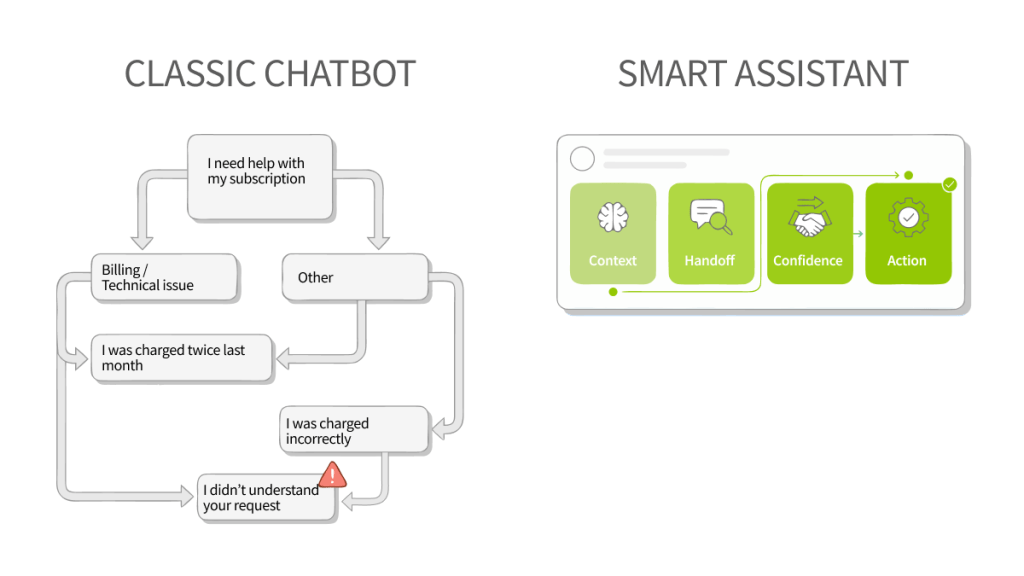
Early chatbots failed for a predictable reason: they tried to replace humans with rigid flows and forced customers into scripted menus.
Modern assistants work in two modes.
Customer-facing mode
They handle straightforward requests, ask the minimum clarifying questions, and collect structured details before escalation. Done well, this reduces time-to-resolution and prevents repetitive “please provide…” loops.
Agent-facing mode
They act as a copilot inside the agent workspace: drafting replies, summarizing threads, pulling policy excerpts, suggesting next steps, and auto-filling forms.
Two rules separate assistants that help from assistants that annoy:
- Clear boundaries on what the assistant can and cannot do
- Transparent handoff to a human when confidence is low, emotions are high, or the topic is sensitive
Where AI delivers measurable impact
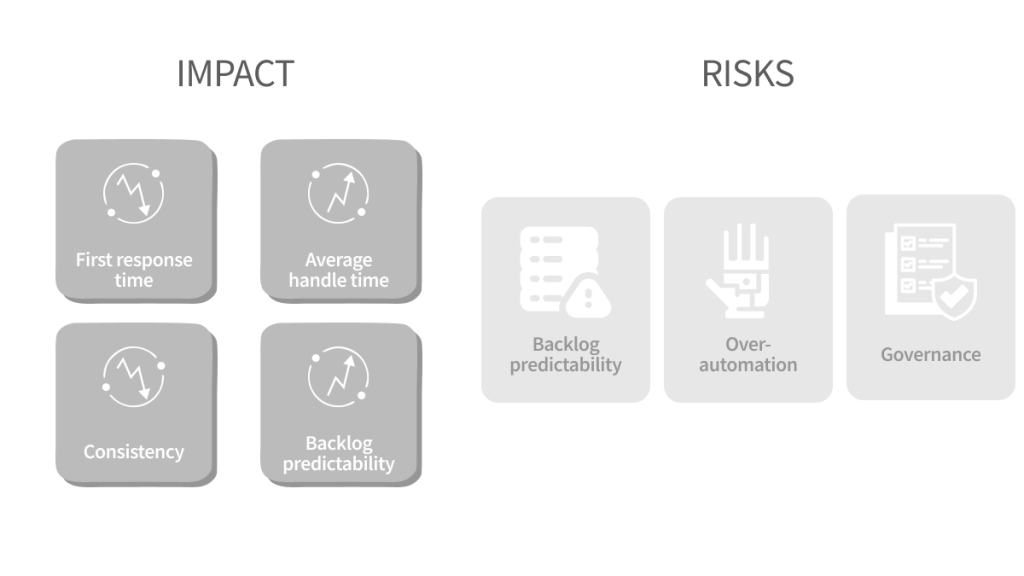
Teams that implement AI successfully usually focus on operational metrics first.
Faster first response and better routing
Intent detection and classification happen immediately, reducing time spent in the wrong queue and cutting the number of transfers.
Lower average handle time
Agents start with a structured summary, relevant context, and a draft response they can edit. This reduces reading time, search time, and repetitive typing.
More consistent quality
AI can enforce consistent policy language, reduce missed steps, and reuse validated knowledge instead of relying on memory or individual habits.
More predictable backlogs
Prioritization based on impact and risk improves throughput and reduces the “everything is urgent” effect.
Cost reduction is real, but the healthiest pattern is efficiency gains that get reinvested into complex cases, proactive outreach, and better retention.
Limitations and risks to plan for
AI is not a universal fix, and careless automation can create new failure modes.
Data quality caps performance
If historical tickets are inconsistent, mislabeled, or full of missing fields, models will learn the same noise and scale it.
Over-automation damages trust
Customers still want a human option, especially for billing disputes, account access, cancellations, and emotionally charged issues.
Governance is not optional
When AI influences refunds, policy decisions, or account actions, you need clear rules, logging, audit trails, and a human override path.
Security and privacy must be designed in
Support data often includes personal information. Access control, redaction, retention rules, and vendor risk review belong in the plan from day one.
How mature teams implement AI without chaos
Strong teams start with process and risk mapping, not vendor demos.
- Segment demand
Group requests by type, volume, handle time, and risk. Identify where automation is safe, where assistance helps, and where human judgment stays central. - Roll out in stages
Start with classification and summarization. Add agent copilot features next. Introduce autonomous actions only after you have controls, monitoring, and rollback procedures. - Measure with a clear scorecard
Track first response time, handle time, transfer rate, CSAT, containment rate (where relevant), recontact rate, and escalation outcomes. Include quality checks, not just speed. - Build a feedback loop
Agents need simple ways to flag bad suggestions, update knowledge, and correct summaries. This is how the system improves without constant retraining projects.
Comparison
| Aspect | Traditional ticket support | AI-assisted support |
| Request routing | Manual rules and queues | Intent-based triage and smarter prioritization |
| Agent workflow | Search-heavy and fragmented | Context-aware assistance inside the workspace |
| Response time | Dependent on backlog | Near-instant classification and routing |
| Consistency | Varies by agent | Standardized guidance and reusable knowledge |
| Scalability | Linear with headcount | More elastic during demand spikes |
| Customer experience | Reactive and repetitive | Faster, more contextual conversations |
Want a clear plan for your support workflows?
If you want to see where AI can reduce workload without increasing risk, we can review your ticket mix, tooling, and operational constraints, then outline a practical roadmap with quick wins and safe automation candidates.
One Logic Soft: https://onelogicsoft.com/
Request a consultation here: https://onelogicsoft.com/custom-software-development


Have a project in mind?
Let's chat
Your request has been accepted!
In the near future, our manager will contact you.
Have a project to discuss?

Have a partnership in mind?