Mobile Self-Checkout for Supermarkets: How to Reduce Checkout Lines Without Adding New Registers
Why Checkout Lines Are Still a Profit and Experience Problem
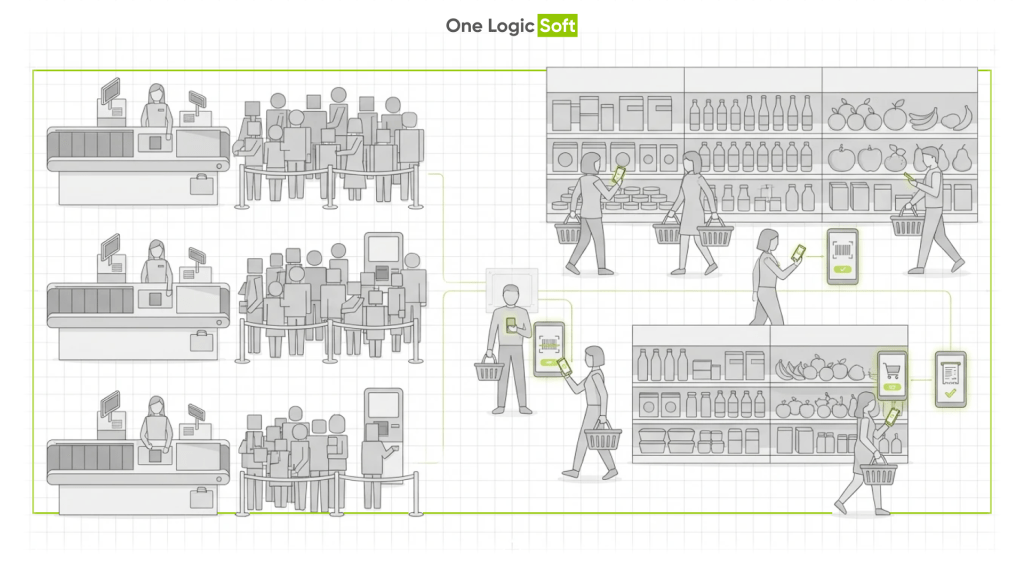
Checkout congestion is rarely caused by a lack of customers. Most supermarkets already have steady demand. The issue appears at the final stage of the shopping journey, when customers want to complete payment and leave the store.
During peak hours, transaction capacity becomes limited by physical infrastructure:
- the number of staffed registers
- the number of self-checkout kiosks
- available floor space in the checkout area
- staff available to supervise transactions and exceptions
This creates a predictable bottleneck at the exact moment when purchase intent is highest.
Once a queue becomes visible, the store begins to pay for it in several ways.
- Basket abandonment at the last step when shoppers see a long line and decide the wait is not worth it.
- Lower repeat visits from customers who associate the store with slow checkout.
- Higher operational pressure on staff when age checks, price corrections, and payment issues accumulate at once.
In practical terms, the friction is not in product discovery. It appears at the moment of payment.
Mobile self-checkout, often called Scan-and-Go, removes that bottleneck by moving scanning and payment away from the checkout zone. Instead of expanding lanes or installing additional machines, the store distributes checkout capacity across customer smartphones.
What Mobile Self-Checkout Means in a Real Supermarket
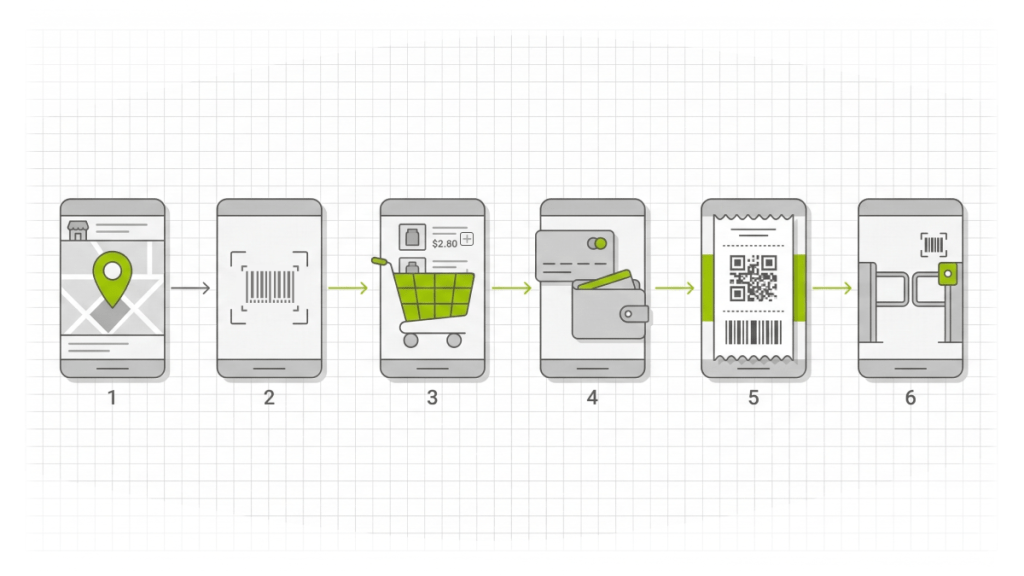
Mobile self-checkout is an in-store flow where customers scan items while shopping and complete payment inside a mobile app. It operates as a parallel checkout system that complements registers and kiosks rather than replacing them immediately.
A typical Scan-and-Go session follows a clear path.
- The customer selects the store location in the app and starts a shopping session.
- Products are scanned as they are placed into the basket.
- The application builds a live digital cart with prices, quantities, and discounts.
- Payment is completed directly in the app using a saved card or mobile wallet.
- A digital receipt is generated and can be used for exit validation if required.
In many implementations the application also becomes a customer engagement channel, delivering loyalty offers, personalized discounts, and product recommendations during the shopping trip.
A real implementation example can be explored in the Retail Mobile Self-Checkout App Case Study..
What Problems Scan-and-Go Solves Without New Checkout Hardware
Faster Throughput During Peak Hours
Traditional checkout systems scale slowly. Opening additional lanes requires more staff, additional equipment, and more space in the checkout zone.
Mobile checkout works differently. Multiple customers scan and pay simultaneously while moving through the store.
The checkout moment becomes distributed instead of concentrated.
Outcome
- More transactions processed per hour without expanding checkout lanes
- Less congestion in the checkout zone
- Smoother traffic flow during peak hours
Lower Dependence on Staff and Devices
Expanding checkout capacity through machines creates ongoing operational costs:
- device maintenance
- supervision
- queue management
- technical failures
Scan-and-Go shifts scanning to customer-owned smartphones. Store staff focus on higher-value tasks such as assistance, validation checks, and exception handling.
Outcome
- Better allocation of staff time
- Fewer hardware bottlenecks
- Less operational pressure around checkout zones
A More Comfortable Customer Experience
Most shoppers do not remember which shelf had the best promotion. They remember the last minutes of the visit: the line, the wait, and the frustration.
Reducing or eliminating checkout queues often improves satisfaction more than changes in merchandising.
Outcome
- Faster visits for routine shopping
- Reduced stress during peak hours
- Higher likelihood of repeat visits
What a Retail Mobile Checkout App Must Get Right
Mobile self-checkout adoption depends on trust and reliability. Customers adopt the system when the experience feels predictable and accurate.
Scanning Performance and Accuracy
Scanning is the first interaction with the system. If scanning feels slow or unreliable, trust drops immediately.
Scanning must work consistently across:
- different lighting conditions
- common barcode formats
- a wide range of smartphone cameras
Key requirement
Fast and reliable scanning across devices.
Price Transparency and Promotion Logic
In grocery retail, pricing accuracy is critical.
Adoption drops quickly if customers see discrepancies between shelf prices and the app.
Potential issues include:
- shelf price not matching the application
- unclear promotion rules
- discounts appearing incorrectly
Key requirement
Real-time pricing that mirrors POS register logic.
Payment Reliability
Payment failures create a new queue: the support queue. If payment feels risky or unreliable, customers revert to traditional checkout.
Payments must be:
- fast
- stable under weak networks
- recoverable after interruptions
Key requirement
Stable payment completion with clear recovery flows.
Low-Friction Validation and Loss Prevention
Self-scanning introduces shrink risk. However, heavy verification can discourage adoption.
Most successful implementations combine lightweight controls with risk-based validation.
Common validation approaches include:
- digital receipt with QR or barcode
- staff verification prompts
- random checks based on policy
- in-app exception handling
Key requirement
Loss prevention mechanisms that protect margins without disrupting customer flow.
Integration Is Where Most Retail Projects Slow Down
Many retailers initially view Scan-and-Go as a mobile application project. In reality, the main complexity lies in backend consistency.
The application depends on several systems working together.
- product catalog and barcode mapping
- pricing engines and promotion logic
- tax configurations
- loyalty programs
- payment processing
- receipt storage
- store-level configuration settings
If catalog data is inconsistent or promotion logic breaks, customer trust disappears quickly.
Key takeaway
The reliability of a mobile checkout system depends on the quality of underlying retail data pipelines.
MVP Scope for a Supermarket Scan-and-Go App
Retailers do not need a full retail ecosystem to launch mobile self-checkout. A focused MVP can validate adoption and operational impact quickly.
Essential MVP Features
A practical first version typically includes:
- barcode scanning
- digital cart management
- real-time pricing
- in-app payment
- digital receipt generation
- basic validation flow
- analytics events across key user actions
Outcome
Retailers can measure adoption rate, transaction throughput, and operational impact using real store data.
Features Added After MVP Validation
Once the system proves stable, additional capabilities can be introduced.
- personalized offers and recommendations
- more complex promotion stacking
- deeper loyalty segmentation
- shared carts across stores
- extended customer account features
Outcome
Faster product launch with lower implementation risk and clearer product insights.
When Scan-and-Go Delivers the Most Value
Mobile self-checkout adoption depends on store format and shopper behavior. The model tends to perform best in stores that have:
- consistent peak-hour congestion
- medium to large basket sizes
- frequent repeat shoppers
- loyalty programs that can be activated in-app
- reliable catalog and pricing systems
In such environments, mobile checkout becomes a capacity multiplier, not just a convenience feature.
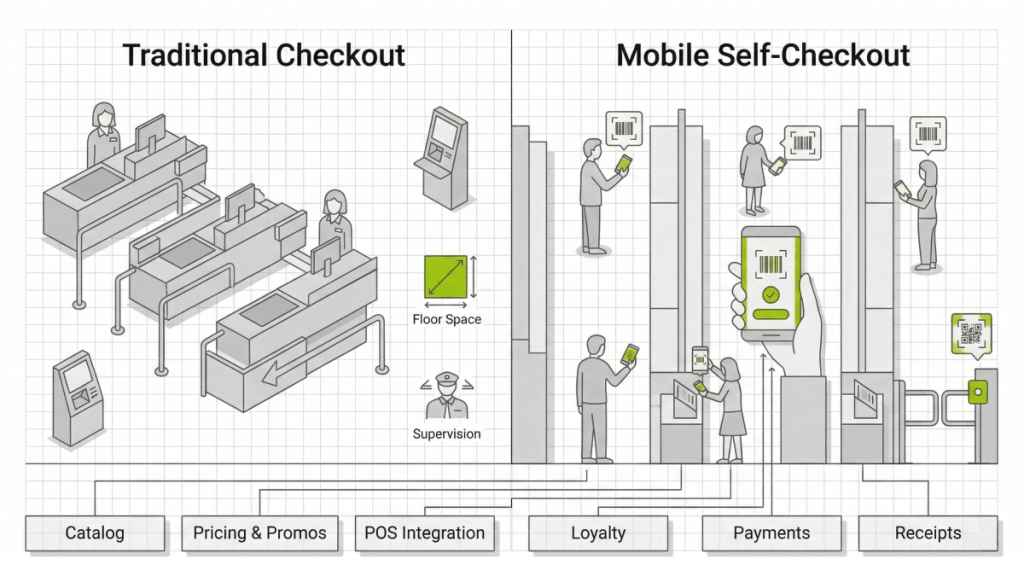
Operational Comparison: Traditional vs Mobile Checkout
| Area | Traditional Checkout | Mobile Self-Checkout |
| Checkout capacity | Limited by number of registers | Scales with smartphone usage |
| Peak-hour queues | Often unavoidable | Significantly reduced |
| Hardware investment | Requires terminals and kiosks | Uses customer devices |
| Staff workload | Queue supervision | Exception handling and support |
| Customer experience | Waiting at checkout | Payment during shopping |
| Store throughput | Limited by checkout zone | Distributed across the store |
FAQ
What is a mobile self-checkout app
A mobile self-checkout app allows customers to scan products while shopping and complete payment directly on their phones, reducing or eliminating the need to wait at traditional registers.
What is the difference between Scan-and-Go and self-checkout kiosks
Self-checkout kiosks move the cashier function to a machine in the checkout area. Scan-and-Go moves both scanning and payment to the shopper’s smartphone, which reduces congestion in the checkout zone.
Does Scan-and-Go increase shrink
Shrink can increase if validation controls are weak. Retailers usually implement risk-based checks such as digital receipts, staff verification prompts, and random basket checks.
What is the biggest technical risk in mobile checkout
Data consistency across systems. Incorrect prices, missing barcode mappings, or broken promotions can quickly reduce customer trust.
How are purchases validated at store exit
Stores commonly use QR or barcode receipts, random validation checks, staff prompts triggered by policy rules, or in-app exception flows.
What to Do Next
If checkout queues limit store throughput during peak hours, expanding the checkout zone is not always the most efficient solution.
At One Logic Soft, we work with retailers to identify where checkout capacity breaks under real traffic conditions and how a mobile Scan-and-Go checkout flow can remove that bottleneck without installing additional registers or kiosks.
The process usually starts with a technical and operational assessment that examines:
- checkout load patterns
- POS architecture
- pricing and promotion logic
- catalog data quality
- integration readiness
Based on that analysis, we define a practical MVP scope for a mobile self-checkout system that integrates with existing retail infrastructure and can be validated using measurable operational metrics.
Examples of similar implementations and delivery approaches can be explored in the retail and commerce case studies available on the One Logic Soft website.
These projects demonstrate how mobile applications and retail platforms can improve store throughput, reduce checkout friction, and scale operations without increasing hardware complexity.


Have a project in mind?
Let's chat
Your request has been accepted!
In the near future, our manager will contact you.
Have a project to discuss?

Have a partnership in mind?