AI Governance Checklist Before Adding AI Agents to Business Software
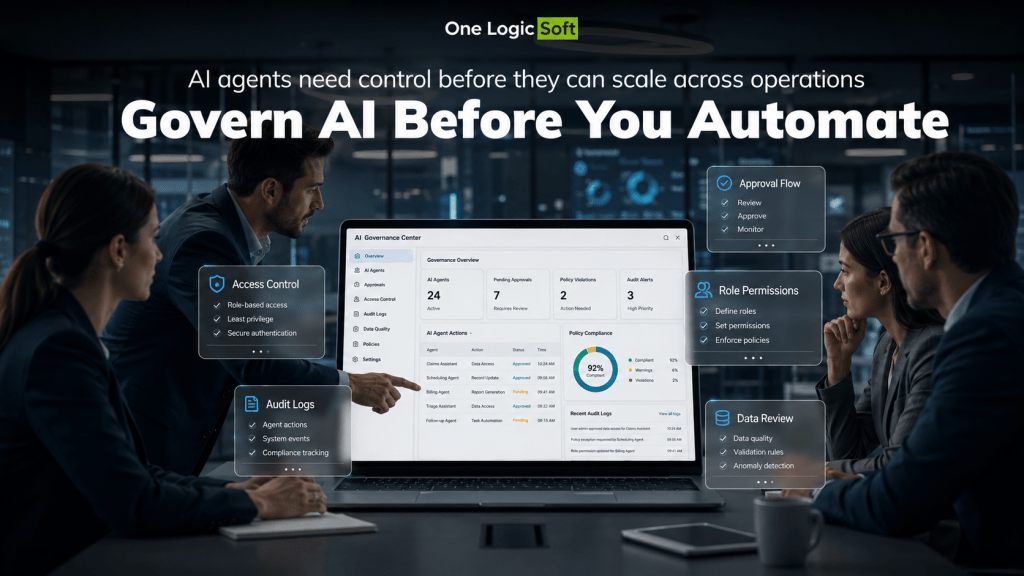
AI agents are becoming part of CRM systems, internal portals, e-commerce platforms, support tools, and workflow automation software. They can prepare replies, update records, summarize requests, check product data, route tasks, and connect business systems.
Yet the main risk is not the AI feature itself. The risk starts when the agent receives access to live data, business rules, customer records, pricing logic, approvals, and connected tools.
Before a company adds AI agents to business software, it needs clear governance. This means defined permissions, approval rules, data limits, logs, ownership, testing, and post-launch review.
What AI Governance Means in Business Software
AI governance is the set of rules that controls how an AI agent works inside a real system. It explains what the agent can read, what it can suggest, what it can change, who reviews its output, and how the company tracks each action.
A simple automation moves through fixed steps. An AI agent adds interpretation. It can read a request, check context, select a tool, prepare a draft, and suggest the next action. That makes the system more flexible, but it creates more room for errors.
For custom software projects, governance should be planned before the agent becomes part of daily work. It is much easier to set boundaries early than to fix uncontrolled AI behavior after launch.
Define the Agent’s Real Job
Keep the First Use Case Narrow
An AI agent should not start with too many responsibilities. The first version should solve one clear business problem where the team understands the workflow, data source, user roles, and expected result.
A safer first use case may be:
- Preparing CRM update drafts
- Classifying support tickets
- Checking missing product fields
- Summarizing internal requests
- Drafting order status notes
- Creating task recommendations
The narrower the use case, the easier it is to test. The team can see where the agent helps, where it fails, and where human review is still needed.
Separate Drafting From Acting
Many AI agents should prepare work, not complete it alone. For example, the agent can draft a support reply, suggest a CRM update, or prepare a product data correction. A person then checks and approves the final action.
This setup gives the team useful AI assistance without giving the agent full control over customer communication, financial records, order status, pricing, or account changes.
Set Clear Access Rules
Decide What the Agent Can Read
Access control is the first security layer. An AI agent should not receive full access to company systems by default.
A support agent may need order history and customer messages. A sales assistant may need lead status, contact notes, and pipeline data. A product data agent may need SKUs, descriptions, attributes, and inventory fields.
Each agent needs its own access profile. The team should block data that is not needed for the task.
Sensitive data can include:
- Payment data
- Passwords
- Private notes
- Legal files
- Salary data
- Security credentials
- Personal IDs
- Contract terms
The agent should work with the smallest useful data set. Less access means less risk.
Decide What the Agent Can Change
Changing data is more sensitive than reading data. Before launch, the team should define whether the agent can create, edit, send, approve, delete, or trigger anything inside the system.
For many business workflows, the agent can prepare the change, but a human user confirms it.
This is especially relevant for refunds, price changes, contract edits, account updates, payment actions, customer-facing replies, order status changes, and legal text.
Build Human Review Into the Workflow
Make Approval Part of the Interface
Human review should not live in a separate spreadsheet, chat, or manual side process. It should be part of the software interface.
The user should see the AI suggestion, the source data behind it, the proposed action, the approval status, the edit history, and the final result.
This helps teams work faster without losing control. A manager, support lead, sales rep, or operations user can check the agent’s suggestion and decide what happens next.
Use Clear Statuses
AI-generated work should have visible statuses. This helps teams track where each item stands.
Useful statuses include:
- Draft
- Waiting for review
- Approved
- Rejected
- Edited
- Sent
- Failed
These simple states make AI workflows easier to manage across teams.
Review Data Before Connecting AI
Clean Data Problems First
AI agents repeat the weaknesses of the systems they use. If the CRM has duplicate records, the product catalog has missing fields, or internal notes are outdated, the agent will work with those problems.
Before adding AI, teams should review the data that will feed the workflow.
Typical issues include:
- Duplicate customer records
- Empty CRM fields
- Old pricing data
- Conflicting product attributes
- Missing ownership fields
- Outdated internal documents
- Unclear product categories
Set Rules for Missing Data
An AI agent should not guess when business data is missing. It needs a safe fallback.
For example, if the agent cannot find contract status, stock level, payment status, or the latest customer note, it should mark the case for review. In some workflows, it can ask the user for missing information before preparing a final draft.
This keeps weak data from turning into wrong actions.
Keep Every AI Action Traceable
Add a Full Audit Trail
Every AI agent needs a readable action history. The company should be able to check what happened without asking developers to search technical logs.
A useful audit trail records the original user request, the agent’s draft, the data source checked, the tool call used, the proposed action, the human edit, the approval decision, the final action, and the time and user ID.
This helps with debugging, support, compliance, and internal review.
Make Logs Searchable
Logs should be searchable by date, user, department, customer, workflow, action type, and approval status. This lets managers find repeated errors and understand how the agent behaves with real cases.
For example, if many AI-drafted replies are rejected, the problem may be weak instructions, missing data, poor source quality, or a workflow that is too broad.
Manage Prompts as Part of the Product
Track Prompt Versions
Prompts are part of product logic. When a prompt changes, agent behavior can change.
Teams should track the prompt owner, version history, date of change, reason for change, test cases, approval notes, and related workflow.
Prompt changes should not happen quietly. A small wording change can affect customer replies, CRM updates, product data checks, or internal task routing.
Test With Real Business Cases
AI testing should include messy examples, not perfect demo requests.
Test cases can include:
- Missing customer data
- Conflicting CRM notes
- Outdated product information
- Failed API responses
- Unclear user requests
- Duplicate orders
- Sensitive customer messages
- High-value accounts
These cases show whether the agent can stop, ask for review, or explain what it cannot verify.
Protect Business Systems From Over-Automation
Avoid Giving AI Too Much Control Too Early
The fastest way to create risk is to connect the agent to many tools at once. CRM, email, billing, support, product catalog, and analytics systems may all be useful, but they should not all become editable by AI from day one.
A staged rollout is safer. Start with read-only access, then draft generation, then human-approved actions. Direct actions can come later, once the team has enough data from real usage.
Use Role-Based Permissions
AI actions should follow the same role logic as the rest of the software. A support specialist, sales manager, finance user, and admin should not have the same AI permissions.
The system should define who can run the agent, view AI suggestions, approve actions, edit prompts, export logs, connect tools, and change permissions.
This keeps AI inside the company’s existing access model.
Measure AI Agent Results After Launch
Track Business Value and Risk
AI governance continues after release. Real users, live data, new edge cases, and changing workflows will expose issues that were not visible during testing.
Useful metrics include:
- Time saved per task
- Approval rate
- Rejection rate
- Average number of human edits
- Error rate
- Escalation rate
- User adoption
- Tasks completed by the agent
These metrics show whether the AI agent helps the team or creates extra review work.
Review Rejected Suggestions
Rejected AI suggestions are valuable. They show where the agent misunderstood data, used weak logic, missed context, or tried to act beyond its limits.
The team should review rejected suggestions regularly and decide whether to adjust prompts, clean data, narrow permissions, or change the workflow.
Common AI Governance Mistakes
Many AI agent projects run into the same problems.
The most common mistakes are giving the agent broad access too early, skipping approval for sensitive actions, testing only clean examples, ignoring data quality, letting prompts change without tracking, keeping audit logs hidden from business users, connecting too many tools in the first release, and launching without a clear owner.
These mistakes are easier to prevent than repair after the agent is already connected to live systems.
Final
AI agents can become useful parts of business software when they work inside clear limits. The best setup gives the agent enough access to support the team, but keeps final control with people where risk is high.
Before adding AI agents to CRM systems, e-commerce platforms, internal portals, or workflow automation software, companies should define permissions, review flows, data rules, logs, prompt ownership, and launch metrics. Teams that are still preparing for rollout can also look at what software teams need before moving from AI pilot to production.
With those rules in place, AI becomes easier to test, manage, and expand across real business processes.


Have a project in mind?
Let's chat
Your request has been accepted!
In the near future, our manager will contact you.
Have a project to discuss?

Have a partnership in mind?