Modular HubSpot Pages with HubL: Blocks, Templates, and Cleaner Scaling
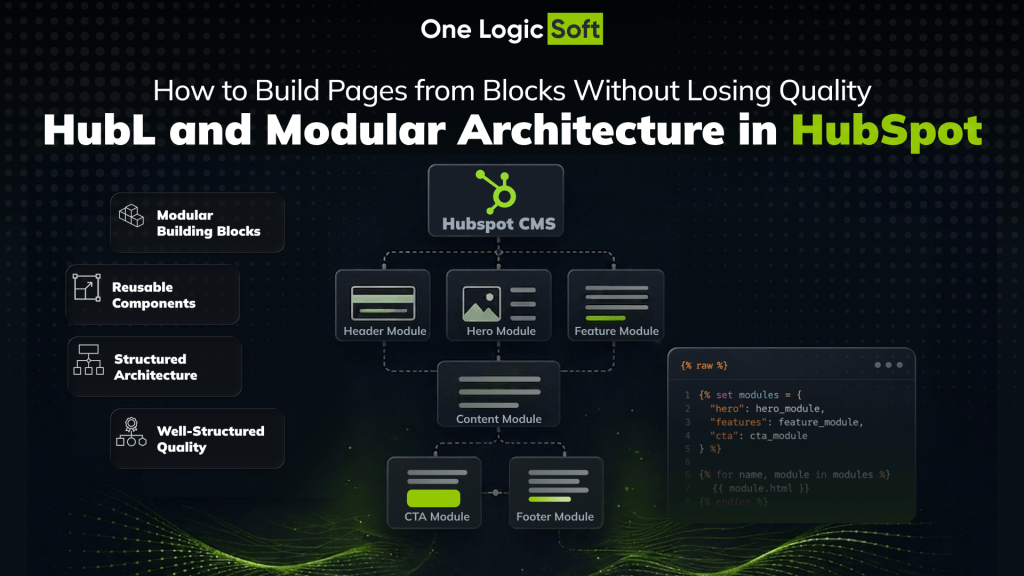
HubSpot CMS is not the biggest CMS on the web, but it is large enough to matter in serious B2B and service-company environments. As of 23 April 2026, W3Techs reports that HubSpot CMS is used by 0.2% of all websites and by 1.0% of websites in the top 1,000,000. At the same time, Google’s current guidance for a good page experience still points teams toward LCP within 2.5 seconds, INP of 200 milliseconds or less, and CLS of 0.1 or less. For HubSpot teams, that makes page assembly a product-quality issue, not just a content-editing convenience.
That is where HubL and HubSpot’s modular system become useful. In the HubSpot developer documentation, HubSpot defines HubL as the templating language used to build templates and modules on the platform. In the same ecosystem, themes act as portable packages of developer assets, modules act as reusable components, and drag and drop areas let content teams assemble layouts without rewriting templates every time.
The value of this setup is simple. A good modular HubSpot build gives marketing teams room to launch pages faster, while development still keeps control over layout logic, styling, lead capture structure, and performance. A weak modular build does the opposite. It creates page variety at the cost of consistency.
Why HubSpot page assembly should be treated like a system
Most teams do not struggle because they lack blocks. They struggle because they have too many uncontrolled ones. A landing page library grows, a campaign team needs a new hero, sales asks for another use-case page, and someone clones an old template, changes a few sections, adds extra CSS, and ships it. After enough repetitions, the website still looks acceptable on the surface, but the internal logic starts to break:
▪ design patterns drift
▪ spacing becomes inconsistent
▪ forms behave differently from page to page
▪ content creators need developer help for changes that were supposed to be simple
HubSpot’s architecture is designed to avoid that drift. HubSpot describes themes as a package of assets that work together for a flexible editing experience, and explains that theme fields let content creators control global website styles without editing CSS directly. HubSpot also describes themes as a way for developers to build a design system that content creators work within. That is the right way to think about modular HubSpot development: not as a box of blocks, but as a controlled publishing system.
What the modular system in HubSpot actually includes
HubL as the logic layer
HubL is the layer that gives templates and modules structure, conditions, loops, includes, and dynamic output. HubSpot defines it as its templating language, based on Jinjava and inspired by Jinja. In practical work, this is what makes a page template more than static markup. HubL lets one template support multiple content states and layout scenarios without turning into duplicated code.
Modules as reusable content components
HubSpot describes modules as reusable components that can be used inside templates or added through drag and drop areas. This is the core of a scalable page library. A hero module, testimonial block, case study preview, stats strip, FAQ module, comparison section, or CTA panel should be treated as repeatable product pieces, not as one-off page decorations.
Theme fields and module fields as editing controls
HubSpot’s field system matters more than many teams expect. The platform explains that modules and themes use fields defined through fields.json, and those fields become the controls content teams use in the editor. That means field structure is not a minor technical detail. It is the contract between development and marketing. Clear field groups, repeaters, conditions, naming, and sensible defaults directly affect whether content creators can build pages cleanly or make accidental layout mistakes.
Drag and drop areas and reusable sections
HubSpot says drag and drop areas allow content creators to place modules, change layout, and add some styling inside the content editor, while developers provide the predefined structure. HubSpot also explains that sections are the outermost child element in a dnd_area, and that sections can be saved and reused on other pages within the same theme. That combination is what makes page production faster without losing the underlying system.
How to build pages from blocks and still keep quality high
Start with a theme, not with isolated modules
A strong HubSpot project begins with a theme that defines the visual and structural rules of the site. Colors, typography, spacing logic, base wrappers, common partials, and shared module behavior should live at that level. When teams skip this step and jump straight into custom modules, they usually end up with reusable pieces that do not feel like one product. HubSpot’s own documentation frames themes as the package that gives content creators flexibility inside a controlled design system.
Keep modules narrow and purposeful
The most stable modules solve one clear problem each. A pricing block should not also behave like a testimonial carousel, a stats banner, and a CTA strip with ten display modes. Once a module tries to do everything, the editor becomes harder to manage, QA takes longer, and future updates become risky. HubSpot’s modular model works best when each component remains predictable.
Give editors flexibility, but inside guardrails
This is where many websites lose quality. Full freedom sounds attractive, but unlimited freedom often creates inconsistency. HubSpot’s dnd_area approach already gives content teams enough room to add modules, sections, rows, columns, and some styling. That is usually enough for real campaign work. The better move is to define strong defaults, reusable sections, and clean field options, instead of opening every design decision on every page.
Prefer coded HTML plus HubL templates for new work
HubSpot is very clear here. Its documentation states that old visual drag and drop templates are not recommended for new templates. HubSpot says they do not support theme functionality such as theme fields and theme modules, and do not support several newer CMS features, including reusable sections. HubSpot recommends coded HTML + HubL templates with dnd_area instead, because they provide a better experience for developers and marketers. For teams building a scalable site, this is one of the most important architectural choices.
Treat performance as part of the module definition
A reusable block is only valuable if it stays safe to reuse. If each new module adds unnecessary JavaScript, oversized media, layout shift, or poor interaction behavior, the library scales the wrong thing. Google’s guidance on Core Web Vitals gives a practical benchmark here: keep LCP within 2.5 seconds, INP at 200 ms or below, and CLS at 0.1 or below on the templates that drive lead generation and campaign traffic. That is the real quality test for modular development, because reusable components are reused at scale.
How this works in a real HubSpot project
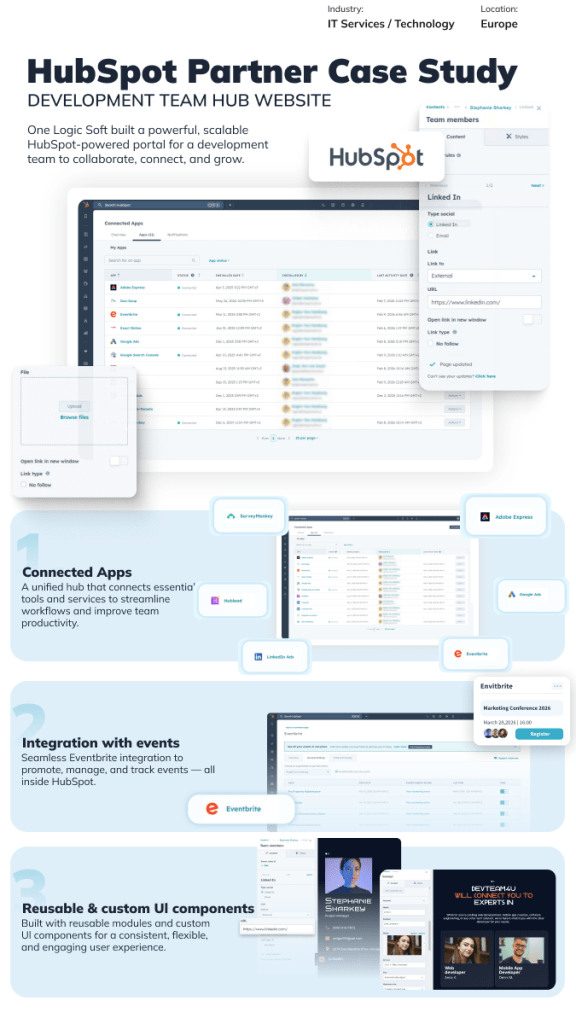
A strong example of this approach appears in One Logic Soft’s HubSpot Partner Case Study. The client was a technology services company that needed a modern HubSpot website combining content management, lead generation, and CRM workflows while still being easy to edit for a non-technical marketing team. According to the case study, the project included custom design components, reusable content components, custom CRM forms integrated with HubSpot CRM and automation workflows, dynamic page logic using HubL, and HubSpot API integrations for future extensions.
The execution details are exactly what a modular HubSpot article should point to. One Logic Soft states that the team built a responsive, performance-optimized frontend with modular components, delivered a reusable module library to keep page structure consistent, implemented CRM forms with automation-ready field mapping, and added HubL-driven dynamic logic for flexible templates and layout variations. The reported business impact included better content creation efficiency, higher-quality lead data, reduced reliance on developers for ongoing updates, and a platform ready for personalization, analytics, and future integrations.
This same positioning is repeated on the company’s all case studies page, where the HubSpot project is summarized as a custom HubSpot CMS website with reusable components, CRM-integrated forms, and HubL-based dynamic templates to streamline content updates and improve lead quality. That matters because it turns the article’s main argument into something concrete. Modular HubSpot development is not just about cleaner code. It affects content speed, lead quality, and the amount of daily developer dependency inside marketing operations.
Common mistakes that weaken a modular HubSpot website
Building too many near-duplicate modules
When teams create three versions of the same hero, four testimonial blocks, two FAQ systems, and multiple competing CTA modules, they reduce clarity for editors and increase QA effort. A shorter, more disciplined module library usually performs better over time.
Overloading fields with weak naming and poor defaults
If a module opens with too many ambiguous fields, content creators slow down and mistakes increase. Since HubSpot’s fields power the editor experience directly, good field design is part of content quality, not an internal technical preference.
Giving content teams layout freedom without governance
HubSpot’s drag and drop tools are strong, but they work best when the developer has already shaped the logic of the page. Without clear section patterns and module rules, a page editor quickly becomes a place where design debt accumulates.
Treating the website as finished after launch
A modular system is not valuable because it is neat on launch day. It is valuable because the fifth campaign page, the twentieth service page, and the next year of content updates still feel consistent. That is why theme logic, module discipline, and performance review should stay active after release.
FAQ
Is HubL only useful for developers?
HubL is developer-facing, but its business value reaches far beyond development. It helps teams create templates and modules with structured logic, which then gives marketers a more stable editing experience inside HubSpot.
What is the difference between a theme and a module in HubSpot?
A theme is the broader package of templates, modules, styles, scripts, and settings that work together. A module is a reusable content component inside that system. Themes set the rules. Modules fill the pages.
Should a non-technical team be allowed to build pages from blocks?
Yes, but inside a controlled framework. HubSpot’s dnd_area model is built for this. The right approach is not to remove flexibility, but to give editors structured flexibility with predefined layouts, reusable sections, and clear module settings.
Are old visual drag and drop templates still a good choice?
For new builds, no. HubSpot explicitly says these templates are not recommended for new templates and points teams toward coded HTML + HubL templates with dnd_area instead.
A simple governance table for modular HubSpot builds
The table below turns the architecture into a working responsibility model. It is a practical way to keep a HubSpot site scalable after launch.
| Layer | Main role | Typical owner | What to standardize | What usually goes wrong |
| Theme | Global design system, styling rules, shared assets | Development | Typography, spacing, colors, wrappers, base behavior | Each template starts inventing its own visual rules |
| Template | Page structure and content logic | Development | Semantic layout, slot structure, default sections | Too many page-specific templates appear |
| Section | Reusable layout chunk inside a page | Development + marketing | Reusable patterns for hero, proof, CTA, forms | Teams rebuild the same section manually every time |
| Module | One reusable content component | Development | Clear purpose, field names, defaults, variants | Modules become overloaded and hard to test |
| Fields | Editor controls for modules and themes | Development | Naming, grouping, conditions, repeaters | Editors see cluttered forms and make avoidable mistakes |
| Content | Page copy, media, CTA choices | Marketing | Messaging consistency, proof hierarchy, conversion flow | Pages stay visually aligned but become strategically uneven |
Final takeaway
HubSpot’s modular system works best when HubL, themes, modules, fields, and drag and drop areas are treated as one architecture. The goal is not to give marketing an endless box of blocks. The goal is to let teams assemble new pages faster without damaging brand consistency, lead capture quality, or performance.


Have a project in mind?
Let's chat
Your request has been accepted!
In the near future, our manager will contact you.
Have a project to discuss?

Have a partnership in mind?