Software Integrations: Why Timelines Slip at API, Data, and Ownership Points
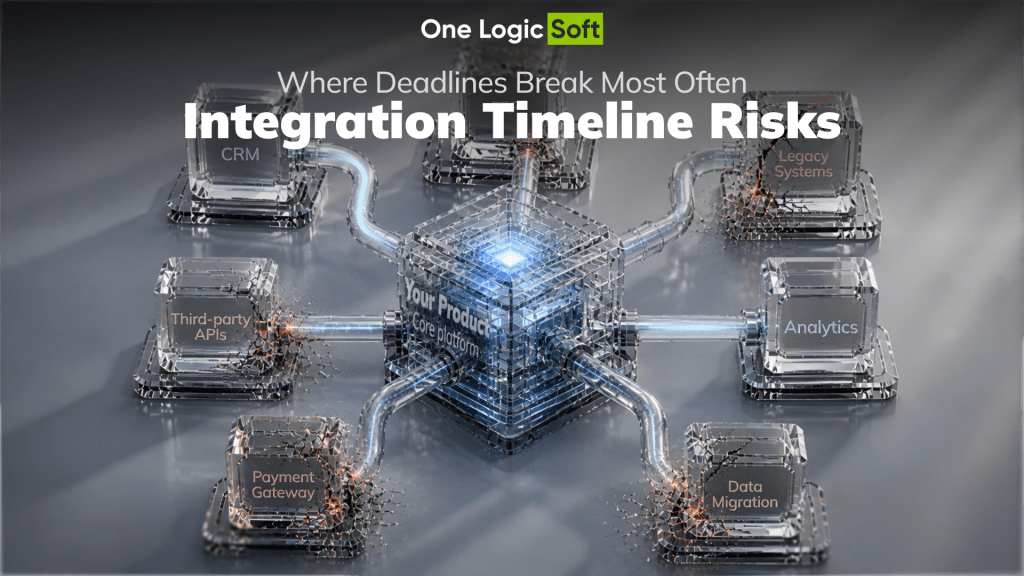
Integrations are where most custom software projects lose time, budget, and trust. A team can build clean interfaces, solid backend logic, well-tested features, and still miss the deadline because the payment gateway returned unexpected errors, the CRM had undocumented field limits, or the ERP sync broke silently under real transaction volume.
The pattern is consistent across industries. According to recent integration solution research, 29% of integration-related projects were not delivered on time in 2025, reversing a positive trend from previous years. A system integrator market report shows that around 52% of projects face complexity with legacy systems, and close to 40% of companies struggle to maintain integrated systems after deployment. These are not rare edge cases. This is the baseline reality for any project that connects more than two systems.
The goal of this article is practical. We will look at where integration project timeline risks actually appear, why standard planning often misses them, and what API integration best practices help prevent delays before they become expensive.
Why Integrations Break Timelines More Than Any Other Part of the Project
Most project plans treat integrations as tasks with clear input and output. Connect system A to system B, sync the data, move on. In practice, every integration is a negotiation between two systems that were not designed to work together.
The core problem is dependency. When a team builds internal features, they control the logic, the data model, the error handling, and the release cycle. When a team integrates with an external system, they depend on third-party documentation, API stability, authentication flows, rate limits, sandbox availability, data formats, and response times that they cannot control.
This dependency creates a specific type of system integration risk: the team cannot fully estimate the work until they start doing it. Discovery during integration is not a failure of planning. It is the nature of the task. The question is whether the project process accounts for this reality or pretends it does not exist.
The Five Integration Points Where Delays Happen Most Often
Not every integration carries the same risk. Some are predictable and well-documented. Others consistently cause problems across different projects, teams, and industries. Based on delivery experience across logistics, retail, healthcare, and e-commerce platforms, these five categories account for the majority of timeline disruptions.
1. Payment Gateway Integration
Payment gateway integration is one of the most sensitive parts of any product. It involves real money, real compliance requirements, and real consequences for errors. Yet many teams underestimate the effort because the gateway provider offers a “simple API.”
The reality is different. Payment systems require PCI compliance awareness, tokenization, webhook handling, retry logic, refund flows, multi-currency support, sandbox testing that often behaves differently from production, and reconciliation with internal order and accounting systems.
Common delay triggers in payment gateway integration include:
- Sandbox limitations. The test environment does not fully replicate production behavior. Edge cases like partial refunds, expired tokens, or currency conversion only surface after go-live.
- Webhook reliability. Payment status updates arrive asynchronously. If the system does not handle missed or delayed webhooks, orders get stuck in incorrect states.
- Compliance and security review. Security audits and PCI requirements add review cycles that are often not included in the original timeline.
- Multi-provider logic. When the product supports multiple payment methods or regional providers, the integration surface multiplies.
A team that has handled payment gateway integration before will plan for these issues. A team encountering them for the first time will likely discover them mid-sprint.
2. CRM and ERP Integration
CRM ERP integration is where business logic meets technical constraints. CRM and ERP systems are built around internal data models that often differ significantly from the product being developed. Field names do not match. Data types are incompatible. Sync direction is unclear. Business rules are embedded in the ERP that nobody documented.
In retail and logistics projects, CRM ERP integration is especially critical because it connects customer data, order data, inventory, pricing, and fulfillment logic. If any of these data flows break, the entire operational chain is affected.
Common delay triggers include:
- Undocumented business rules. The ERP applies discounts, taxes, or validation logic that only becomes visible during integration testing.
- Data mapping complexity. Fields in the CRM do not map directly to fields in the product database. Transformation logic needs to be built and maintained.
- Rate limits and batch constraints. ERP APIs often have strict throughput limits that affect sync speed and require queue management.
- Version differences. The client’s ERP version may differ from the one described in the official documentation, introducing unexpected API behavior.
3. Third-Party Service APIs
Every modern product connects to external services: maps, notifications, SMS, email, analytics, shipping providers, tax calculators, identity verification, and more. Each connection adds a dependency that the team does not fully control.
The risk is not that these APIs are poorly built. Most are reliable. The risk is that the project plan assumes each integration takes a fixed number of hours, when in reality the effort depends on documentation quality, sandbox availability, authentication complexity, and error handling requirements.
Following API integration best practices helps reduce this risk. Specifically, teams that version their API contracts, implement proper error handling with circuit breakers, use schema validation, and monitor for API drift tend to absorb third-party surprises without derailing the sprint.
4. Legacy System Connections
Many projects involve connecting a new product to an existing legacy system that the client has been using for years. The legacy system may use outdated protocols, have no formal API, require file-based data exchange, or depend on manual processes that need to be automated.
Legacy integrations are difficult to estimate because the documentation is often incomplete, the system behavior is only known by one or two people inside the client’s organization, and testing requires access to environments that may be slow, restricted, or unstable.
5. Data Migration and Initial Sync
Before a new system can go live, it usually needs to receive data from the old system. This migration step is frequently underestimated because it looks simple on paper: export from A, transform, import into B.
In practice, data migration reveals data quality issues that nobody expected. Duplicate records, missing fields, inconsistent formats, broken references, and historical data that does not fit the new data model. Each of these issues requires a decision, a fix, and a retest.
Why Standard Project Planning Fails at Integration Tasks
Traditional project planning works well for tasks where the scope is clear and the team controls the output. Integrations break this model because the scope depends on external factors that are only partially visible before work begins.
Three planning mistakes appear consistently:
Flat estimation. The team estimates “integrate with payment provider” as a single task with a fixed number of hours. In reality, it is a set of subtasks — authentication, transaction flow, webhook handling, error states, reconciliation, testing each with its own complexity and dependencies.
No buffer for discovery. Integration work often reveals requirements that were not in the original scope. A well-planned integration project timeline includes explicit discovery phases and buffer time for each external connection.
Sequential dependency chains. When integrations are planned as a sequence — finish A, then start B — a delay in one integration blocks everything downstream. Parallel planning with clear dependency mapping reduces this risk.
How to Prevent Integration Delays: A Practical Framework
Preventing delays does not require eliminating risk. It requires making risk visible and manageable. The following practices are drawn from delivery experience across projects involving logistics platforms, retail software development, e-commerce systems, and healthcare booking tools.
Start Integration Discovery Before Development
Do not wait until the development sprint to read the API documentation. Integration discovery should happen during the project preparation phase. This means reviewing API docs, checking sandbox access, testing authentication, understanding rate limits, and mapping data flows before the first line of integration code is written.
Early discovery surfaces problems when they are cheap to solve: missing API access, incompatible data formats, unclear business rules, and missing endpoints.
Isolate Integration Work from Core Feature Development
Integration tasks should be tracked separately from internal feature work. When integration and feature development are mixed in the same sprint, integration delays silently push feature work to the next cycle.
A stronger approach is to assign integration work to a dedicated track with its own backlog, its own risk register, and its own demo cadence. This makes delays visible without blocking the rest of the team.
Build Integration Contracts Early
Before connecting two systems, define the contract between them. What data goes in. What data comes back. What happens when the call fails. What retry logic applies. What error codes are expected. What monitoring is needed.
This contract becomes the source of truth for both the development team and the client. When the contract is defined early, changes are easier to manage because everyone can see what is affected.
Plan for Sandbox Gaps
Every team that has worked with external APIs knows that sandboxes do not perfectly replicate production. Plan for this. Include a testing phase that explicitly covers production-like scenarios: high volume, edge cases, timeouts, expired tokens, and concurrent requests.
If the sandbox does not support a critical scenario, document it as a known risk and plan a production validation step after launch.
Use Integration-Specific QA
General QA processes often miss integration-specific failure modes. A payment webhook that arrives 30 seconds late. A CRM sync that drops a field when the record exceeds a character limit. An ERP response that changes format between versions.
Integration QA should include contract testing, error injection, timeout simulation, and data consistency checks across systems. These tests should run in CI/CD pipelines and not only during manual QA sprints.
Integration Risk Checklist for Project Managers
| Risk area | What to check before development | Warning sign |
| Payment gateway | Sandbox access, webhook support, PCI scope, multi-currency | No sandbox or sandbox differs from production |
| CRM / ERP | API version, field mapping, rate limits, sync direction | Client cannot explain current ERP business rules |
| Third-party APIs | Documentation quality, auth method, rate limits, SLA | No sandbox, unclear versioning, no error code reference |
| Legacy systems | Protocol, data format, access restrictions, key contacts | Only one person knows how the legacy system works |
| Data migration | Data quality, volume, format consistency, rollback plan | No sample data available for testing |
How Case Studies Show Integration Readiness
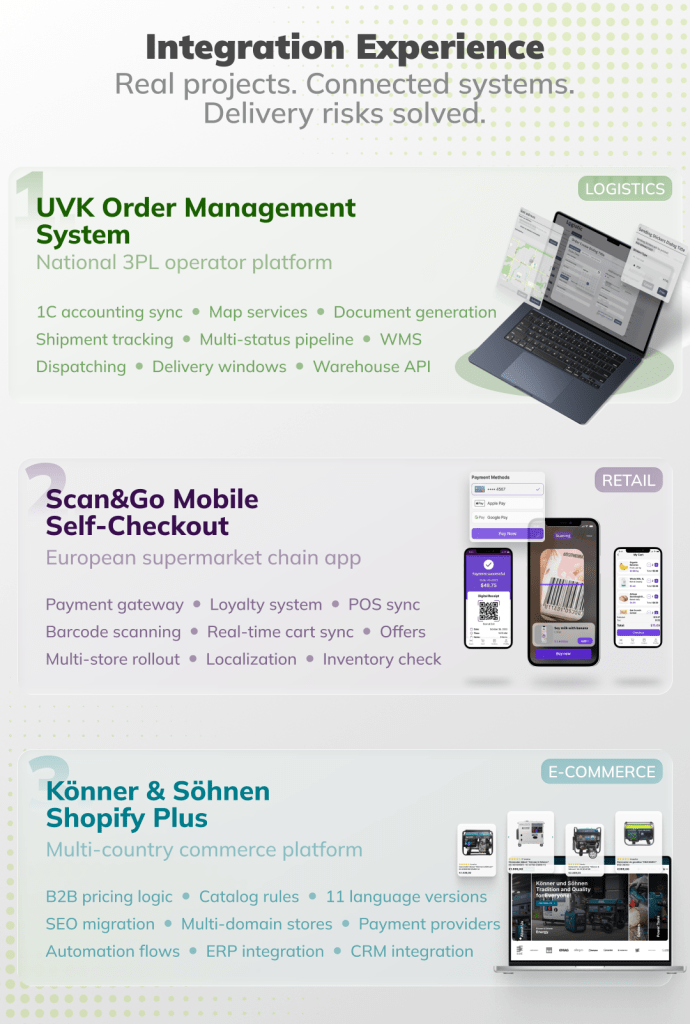
When selecting a development partner for a project with heavy integration requirements, case studies are one of the most reliable indicators of real delivery capability. A team that has successfully connected payment systems, CRM platforms, ERP backends, and third-party services in production has already encountered and solved the problems described above.
At One Logic Soft, integration work is part of nearly every project we deliver. The UVK Order Management System required integration with 1C, mapping services, document generation, and multi-stage shipment tracking. The Scan&Go Mobile Self-Checkout project involved payment gateway integration, loyalty system connections, and real-time cart synchronization for a retail software development context. The Könner & Söhnen Shopify Plus platform connected regional stores, B2B pricing logic, catalog rules, and multi-language content across multiple domains.
Each of these projects required integration planning that started before development, dedicated integration tracks during delivery, and post-launch monitoring to ensure stability under real load.
When One Logic Soft Fits the Project
One Logic Soft is a strong fit for projects where integrations are not an afterthought but a core part of the product logic. This includes platforms that connect to payment providers, CRM and ERP backends, warehouse systems, logistics APIs, booking engines, and multi-channel commerce tools.
For companies planning custom software development with complex integration requirements, we bring experience in managing the system integration risks that most commonly cause timeline overruns. Our Case Studies section shows how we handle these challenges in practice — across retail, logistics, healthcare, and e-commerce.
If your project involves connecting multiple systems and you want to prevent integration delays from the start, get in touch to discuss your requirements.
FAQ
Why do integrations cause more delays than other project tasks?
Integrations depend on external systems that the development team does not control. Documentation gaps, sandbox limitations, undocumented business rules, and API behavior differences between test and production environments create discovery work that is difficult to estimate in advance.
What are the most common system integration risks?
The most common system integration risks include undocumented API behavior, data format mismatches between systems, sandbox environments that do not replicate production, rate limits that affect sync performance, and legacy systems with no formal API or incomplete documentation.
How should a team plan an integration project timeline?
An integration project timeline should include a dedicated discovery phase before development, separate tracking for integration tasks, buffer time for each external connection, explicit dependency mapping, and integration-specific QA that covers contract testing, error injection, and data consistency checks.
What API integration best practices reduce project risk?
Key API integration best practices include early API discovery during project preparation, defining integration contracts before development, implementing proper error handling with retry and circuit breaker logic, using API versioning, running schema validation, and monitoring API performance and drift continuously.
How does payment gateway integration affect project timelines?
Payment gateway integration affects timelines because it involves compliance requirements, multi-step transaction flows, asynchronous webhook handling, sandbox limitations, and security reviews. Teams that underestimate these factors often discover critical issues late in the project.
What makes CRM ERP integration difficult?
CRM ERP integration is difficult because these systems contain embedded business rules that are often undocumented, use data models that differ from the product being built, impose rate limits on API access, and may behave differently across software versions.
How can case studies help evaluate a development partner’s integration experience?
Case studies that show real integration work payment connections, CRM syncs, ERP data flows, third-party API management demonstrate that the team has encountered and resolved the specific problems that cause delays. Look for projects with similar technical scope and business complexity to your own.


Have a project in mind?
Let's chat
Your request has been accepted!
In the near future, our manager will contact you.
Have a project to discuss?

Have a partnership in mind?